# 自动化测试

Data tests are assertions that you make about models and resources in a project. These tests validate the correctness of the transformed data and ensure results from the model meet predefined standards. At its core, a data test is simply a SQL or Jinja query that selects rows meeting a failing condition.

Data test is one of the *dbt* artifacts that Recurve integrates into its data validation capabilities.

There are two types of data tests:

* **Generic test**: a test designed to be reusable across multiple models, columns, or tables. It targets specific data but can be applied broadly to check for common conditions or constraints.&#x20;
* **Singular test**: a custom SQL-based test where you can write a specific SQL query to validate data. It is typically used for more specific or complex checks that are unique to a particular model or situation.

Recurve provides a wide collections of template for built-in generic tests, as well as the flexibility to write custom queries to cover more advanced scenarios. Built-in generic tests provide the the basic but essential validations, such as `NULL` check or referential integrity, while custom generic tests and singular tests can deal with complex business logic.

As with any quality control practice, we recommend starting with most basic testing scenarios before moving to complex cases. You can first apply built-in generic tests to validate the core assumptions about your dataset structure, then add custom tests to reflect specific business rules.

## Test categories

Data tests are associated with categories that reflect relevant business metrics:

<table><thead><tr><th width="159">Category</th><th>Defintion</th><th>Example</th></tr></thead><tbody><tr><td>Freshness</td><td>Check the timestamp to see if the data is up-to-date and made available for the intended use cases.</td><td><p></p><ul><li>A daily sales report should have data of the most recent transactions.</li><li>Raw data is expected to be ingested daily before 6pm.</li></ul></td></tr><tr><td>Volume</td><td>Check that number of rows are properly processed and falls within a specified range.</td><td><ul><li>Updated data should be no less than 1000 records everyday.</li></ul></td></tr><tr><td>Completeness</td><td>Check if there are missing values in datasets.</td><td><ul><li>Timestamp column should not contain <code>NULL</code> values.</li><li>Name column should not contain empty strings.</li></ul></td></tr><tr><td>Validity</td><td>Check if values in a column falls within a specified list or adheres to a defined format.</td><td><p></p><ul><li>String value should be within the list of enums.</li><li>Numeric value should be within the expected data range.</li></ul></td></tr><tr><td>Uniqueness</td><td>Check for undesired duplicates of data within a dataset.</td><td><ul><li>In the <em>order</em> table, no two records should have the same combination of <code>order_id</code> and <code>product_id</code> values.</li></ul></td></tr><tr><td>Consistency</td><td>Check if aggregated data aligns correctly with the expected results.</td><td><ul><li>The total sales amount in <em>monthly_sales</em> is aggregated from daily transactions in <em>daily_sales</em> table. Consistency check should be applied to ensure montly total sales is consistent with the sum of daily sales.</li></ul></td></tr></tbody></table>

## Test severity

A data test applied to an asset returns a list of failing rows as its result. Each test result has a severity level indicating its significance: Passed, Warning, or Error.&#x20;

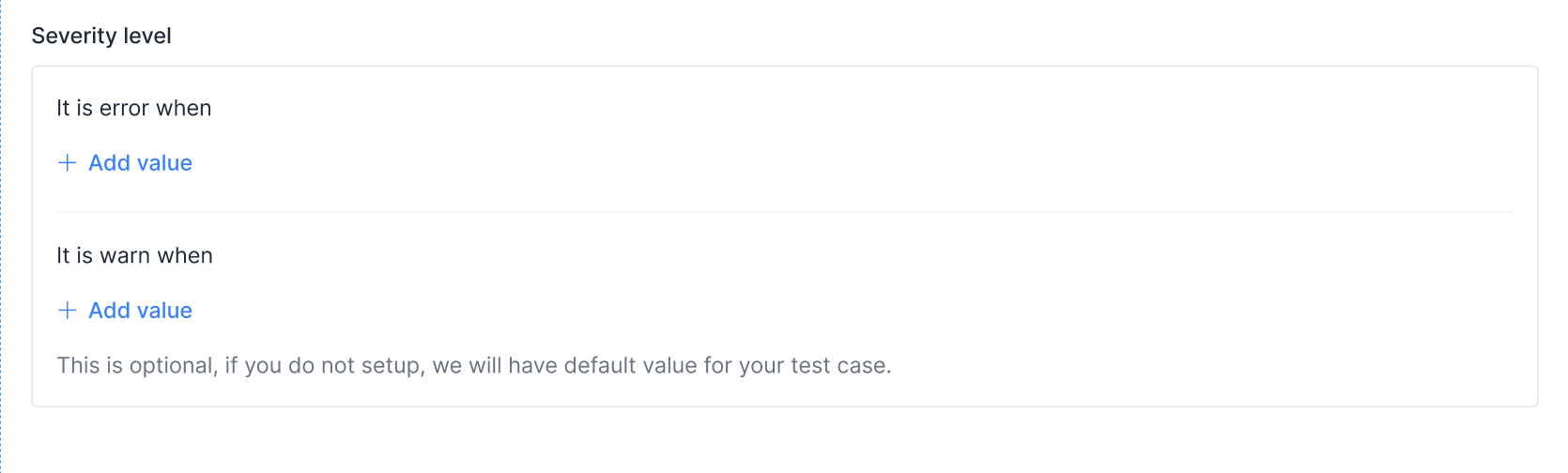
In the **Severity level** section of a test, you can set thresholds for these levels based on the number of failures:

<figure><img src="/files/1WQw2EjwI65CbVkGJAFC" alt=""><figcaption></figcaption></figure>

For example, a test that checks for data completeness (columns with `NULL` values) can have the following thresholds:

* **Error** if the `NULL` % is greater than 10%.&#x20;
* **Warning** if the `NULL` % is between 0% and 10%.
* **Passed** otherwise.

## Create test from a template

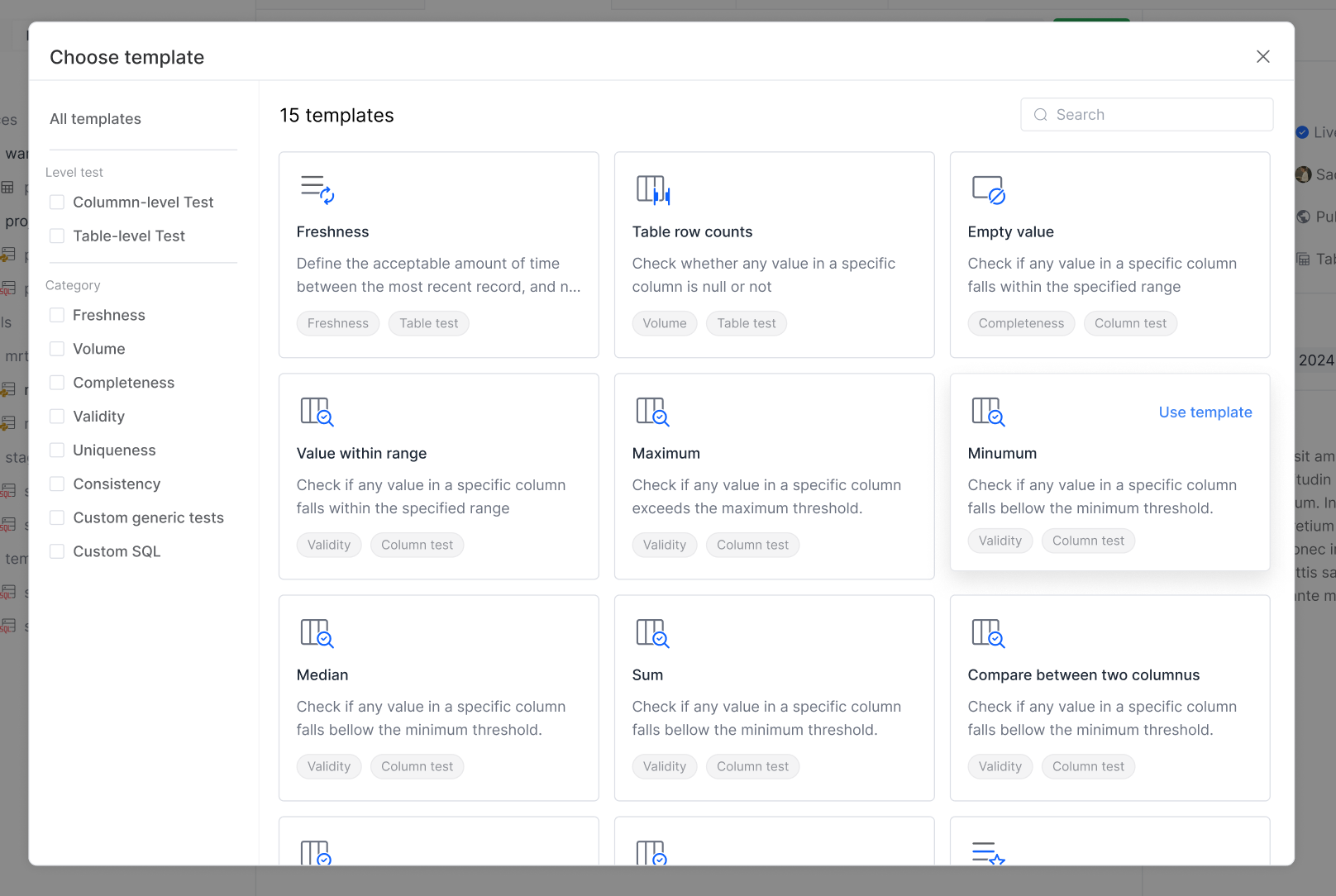
Test creation is centralized in the **Test case template** section, which displays all available test artifacts, including:

* **Templates**: templates for built-in generic tests, organized by their scope (column-level or table-level) and by test category.&#x20;
* **Custom generic tests**: generic tests defined in project library. See: [Custom generic tests](/cn-reorc-help-center/shu-ju-jian-mo/zi-dong-hua-ce-shi/custom-generic-tests.md).
* **Custom SQL**: singular tests for one-off use cases. See: [Singular tests](/cn-reorc-help-center/shu-ju-jian-mo/zi-dong-hua-ce-shi/singular-tests.md).

{% hint style="info" %}
Currently, Recurve supports adding tests to a model.
{% endhint %}

Follow these steps to create a test from template:

1. Open your model in the editor.
2. Switch to the **Test cases** tab and click **+ Add new**.
3. In the test template, you can see all the available test templates, including the templates for built-in tests and custom tests. Select a desired template.

   <figure><img src="/files/WfwzVXM3oXLJE4UOeMOJ" alt=""><figcaption></figcaption></figure>
4. Configure the test case.&#x20;

   The configuration may differ between templates. For example, in the template for **Row Values Freshness Check**, we need to specify the following:

   * Name: the displayed name in the test case list.
   * Description: provide the description to communicate your intentions.
   * Track data from column: specify the column to apply the test condition.
   * Condition (optional): limit the scope of the test to only certain rows based on specific criteria, ensuring that the comparison is meaningful within a defined context.
   * Severity: set the threshold for severity levels. See: [#test-result-and-severity](#test-result-and-severity "mention").
5. Click **Add**.

The new test will be displayed in the **Test cases** tab of the model.

## Test execution

Data tests assigned to a model are executed when you:

* Build and run the model using console. See: [Console](/cn-reorc-help-center/zi-chan-guan-li/console.md).
* Run a pipeline that involves the model. See: [任务调度](/cn-reorc-help-center/shu-ju-guan-dao/ren-wu-diao-du.md).


---

# Agent Instructions: Querying This Documentation

If you need additional information that is not directly available in this page, you can query the documentation dynamically by asking a question.

Perform an HTTP GET request on the current page URL with the `ask` query parameter:

```
GET https://docs.reorc.com/cn-reorc-help-center/shu-ju-jian-mo/zi-dong-hua-ce-shi.md?ask=<question>
```

The question should be specific, self-contained, and written in natural language.
The response will contain a direct answer to the question and relevant excerpts and sources from the documentation.

Use this mechanism when the answer is not explicitly present in the current page, you need clarification or additional context, or you want to retrieve related documentation sections.